
Early in my teaching career, PDS decided to provide each lower school classroom with a computer. Well, I should probably say "so-called computer," as the machine that graced my own classroom bore practically no resemblance to the current PDS fleet of laptops.
The machine, IIRC (and I'm sure I do RC), consisted of a keyboard, a monitor with a black-and-green screen, a separate drive for floppy disks (and floppy they were), and a whole mess of unnecessary wires. No mouse, no trackpad. No internet connection, no CD drive. No color, no sound. No bells, no whistles.
Oh, there was a printer of some description, a noisy and unreliable machine that routinely shredded the paper you fed it and printed letters better suited to connect-the-dots than to actual, you know, legibility.
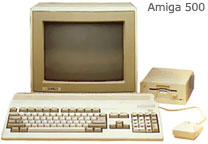
The machine, which looked something like the one pictured above (minus the mouse), could do two things. The first was word processing, or what passed for it during the early-to-mid-eighties. The word processing was courtesy of a program called Bank Street Writer, which had been developed specifically for use in "educational settings." From where I sat it was hard to see why anyone had bothered. Bank Street Writer was clunky. It was slow. It was inefficient. It was practically useless. You had to use the keyboard arrows to select text for editing, which took forever, and they kept throwing the mid-eighties version of dialogue boxes at you when you did ("Are you sure you want to select this block of text? Y/N" "Are you REALLY sure? Y/N" "Are you positive? Y/N" "Are you sure you want to move it to the indicated place? Y/N" "Do you have any idea why we are asking all these questions? Y/N" "Don't you wish you'd decided to write this out longhand instead? Y/N.") Saving was a slow and frustrating process, as was retrieving previously-saved files. There was one difficult-to-read font (though there may have been two sizes, I'm not sure), and formatting was just about nonexistent. After a number of ol' college tries to find any way in which this program represented an improvement over almost anything else, I washed my hands of it and went back to the trusty old typewriter.

The other program was better. It was called LOGO, which was always written in capital letters though I'm not sure it actually stood for anything. LOGO allowed kids to do simple programming in a geometric context. You had what they called a turtle, which actually looked like a triangle but what the hey, and it sat there on the screen waiting to be told what to do. Kids could then type in various commands to make the turtle move. Typing in "BK 20," for instance, got the turtle to go 20 units in reverse (BK=backward, clever huh? and you thought it stood for Burger King). "FD 5" made it go forward 5 units. As it moved, it drew a line behind it. You couldn't make it go directly up or down, but you COULD make the turtle turn. Typing "RT 90" instructed it to spin 90 degrees to the right; "LT 135" got it to...well, you can figure it out.
There were lots of things to like about Logo, scuse me, LOGO. Kids had to type the directions using a specific format: if they typed "FD85" instead of "FD 85," the program would give them an error message. That made the children focus on precision--and helped demystify the computer and its abilities ("yup, it can do amazing things--but it CAN'T figure out what to do when it sees 'LT50' because NO ONE TOLD IT WHAT TO DO when someone mistypes something"). Kids very much enjoyed pretending to be the turtle and giving each other directions: "Okay, forward six steps..." The spatial reasoning aspect of LOGO was excellent--which way do I have to turn if I want to go straight up? what number do I need to input? And the use of left and right and the intro to angle measures were both valuable.
LOGO did have an issue. One goal of the software was to have kids program the turtle to make certain figures--squares, houses, and so on. Can you make a triangle? The letter Z? How? A few kids did get into this. Many, however, quickly decided that the REAL point of the program was to get the turtle to make random lines. We got lots of "FD 400" "FD 40" "FD 400" "FD 989"-style programs in which the turtle made a line to the right, disappeared off the right edge of the screen, came back on the left, and continued to do this for as many commands as the children had told it while the onlookers giggled. Another popular activity was to ignore the FD and BK commands in favor of having the turtle spin endlessly in place: LT 900, RT 42, LT 656, RT 851. Somebody figured out that if you told the turtle to make a turn of 1 unit before doing the FD commands, you could eventually have the turtle criss-cross the entire screen, effectively whiting it all out.
These were cute, and they required some thought at first (especially the white-out one), but once that initial thinking was over the activities quickly became kind of useless educationally. Kids weren't learning anything by repeatedly typing in BK 77 BK 77 BK 77, and the more they did that the less willing they seemed to want to engage in the actual making of shapes. There was something highly motivating about watching the turtle spin this way and that, and in contrast the work of plotting how to make a square seemed considerably less compelling. How you gonna keep 'em down on the farm, as the WWI song went, after they've seen Paree? Under these circumstances LOGO rapidly became less a tool for learning than a diversion for entertainment, and after a couple of years that began to sour me on the whole program. When "real" computers came along LOGO and its derivatives were not high on my list.
This year, though, I returned to my LOGO-ish roots. For our ongoing geometry unit in the 1-2 classes, we decided that I would pull kids during some of their math times and do some computer work. I'd pull out the laptops and work with kids on one or more of the virtual manipulatives at the Utah Sate University website: http://nlvm.usu.edu/. A lot of these materials are really excellent. Rods don't fall on the floor. Pattern block designs don't get wrecked when someone accidentally shakes the table. Virtual rubber bands don't break when you stretch them across a virtual geoboard. While not all materials on the site are equally great, many are quite wonderful.
But after looking through the various manipulatives on the site, I decided to focus on the most LOGOlike one: a program called Ladybug Leaf.
 (If you click on Geometry on the home page, it will be about 6 or 7 buttons down in the list.) The object of Ladybug Leaf is to direct a ladybug, LOGOstyle, to hide under a leaf. The graphics are far clearer and more engaging than they were in the old LOGO program. The ladybug is a real ladybug; the bug moves in clearly demarcated units; the leaf is a real leaf. The order of commands remains on the screen as the ladybug moves, with each command flashing briefly as the ladybug carries out that particular action. It's easy to replace a command, too--much easier than it used to be! True, FD 25 and LT 90 are things of the past in this activity, and I do kind of miss them. Instead, there are buttons you can click that will move the bug one unit forward or backward, or spin it 45 or 90 degrees to the left or the right. On the other hand, angle measures aren't exactly a staple of first and second grade mathematics, and you can always introduce the terms 45 and 90 degrees yourself.
Anyhow, the kids have been very much enjoying their venture into LOGOlike technology--and, I would like to think, learning important stuff along the way. It helps that in the last twenty-plus years I have learned a few things myself. In particular, I made sure to focus this time around on specific tasks: hide the bug under the leaf, move the leaf and hide it again, make a square, make a triangle, make a house (a house! See below, courtesy of one very thoughtful and dogged second grader)

There's nothing wrong with entertainment for its own sake, but I want a little more from, you know, school.
And how can I complain when that first grade girl who is ordinarily so reserved and so serious, after successfully planning a route to the leaf for her ladybug, celebrated by standing up and chanting "Oh yeah, oh yeah" while doing some disco moves?
Now if only someone could make some improvements to Bank Street Writer...


